

If you’re using Sage 200 and struggling with warehouse operations, you’re not alone. As businesses grow, Sage 200 alone often isn’t enough to manage picking, stock accuracy, and multi-channel fulfilment efficiently.
In this guide, we break down the best warehouse management systems (WMS) for Sage 200, what features to look for, and how modern fulfilment platforms are helping businesses scale beyond traditional warehouse tools.
👉 Looking for a modern, scalable solution? See how Modulus365 works with Sage 200
Why Sage 200 Users Need a Warehouse Management System
While Sage 200 is a powerful ERP, it was not designed to manage complex warehouse operations at scale.
- Manual picking processes
- Limited bin-level tracking
- Stock discrepancies across locations
- Lack of real-time warehouse visibility
- Difficulty managing multi-channel orders
As order volumes increase, these challenges can lead to inefficiencies, errors, and operational bottlenecks.
Key Features to Look for in a Sage 200 WMS
- Real-time inventory visibility across warehouses and channels
- Barcode scanning and mobile picking
- Multi-warehouse and bin management
- Order orchestration across channels
- Carrier and shipping integrations
- Returns and reverse logistics management
- Operational analytics and reporting
The right solution should not just manage stock — it should optimise the entire fulfilment process.
Traditional WMS vs Modern Fulfilment Platforms
| Feature | Traditional WMS | Modulus365 |
|---|---|---|
| Scope | Warehouse-only | End-to-end fulfilment |
| Architecture | ERP add-on | Cloud platform |
| Order orchestration | Limited | Advanced |
| Multi-channel support | Basic | Native |
| Analytics | Operational reports | Fulfilment intelligence |
Modern businesses increasingly require a fulfilment platform rather than just a warehouse tool.
How Modulus365 Works with Sage 200
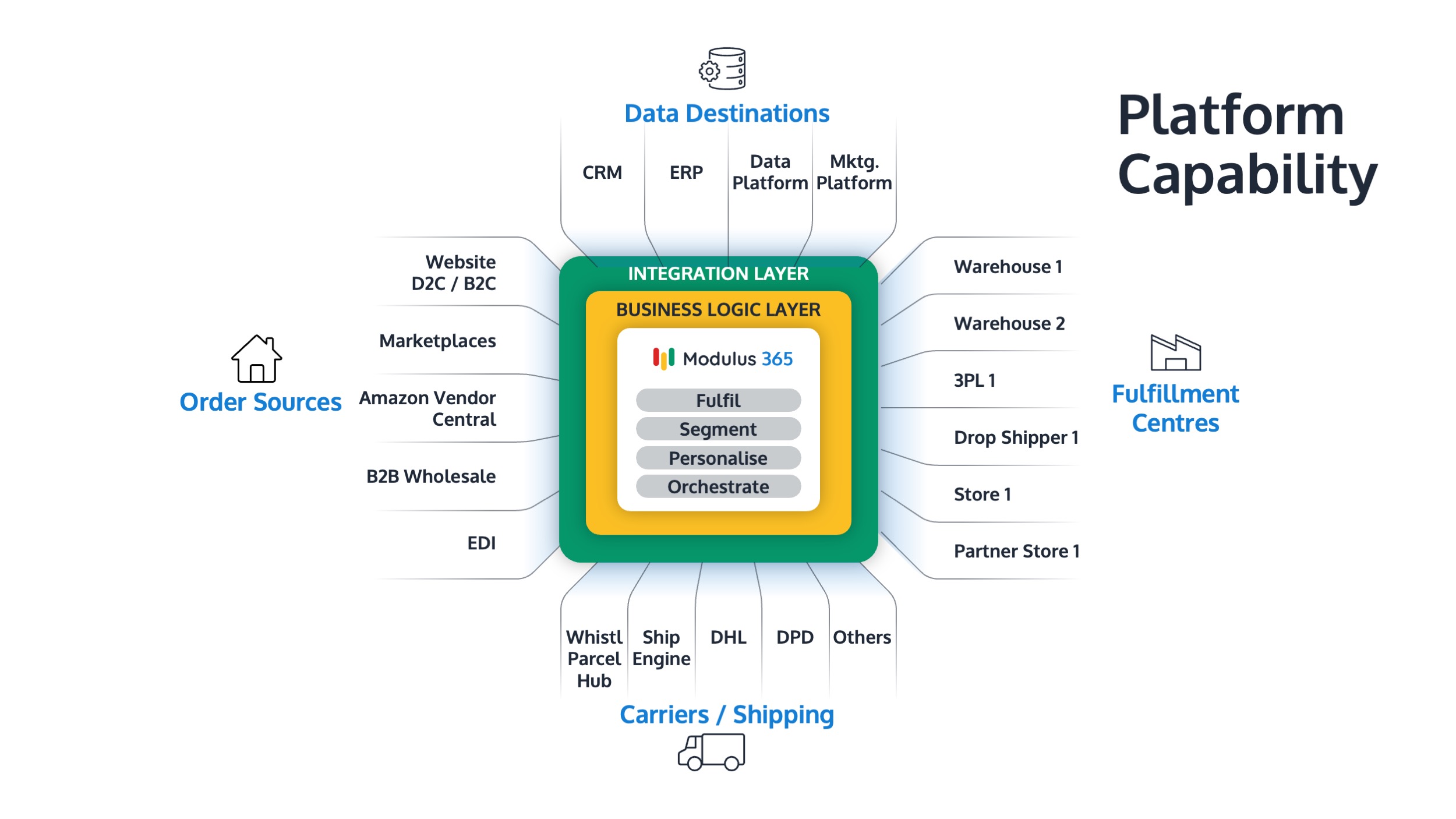
Modulus365 sits between Sage 200 and your warehouse operations, acting as the fulfilment orchestration layer.
- Syncs orders, customers, and stock with Sage 200
- Manages warehouse operations with scanning and automation
- Integrates with ecommerce platforms and marketplaces
- Connects with carriers for shipping and tracking
- Provides real-time operational visibility
This allows businesses to scale fulfilment operations without overloading their ERP.
Signs You Need a WMS for Sage 200
- Increasing picking errors
- Stock discrepancies
- Manual processes slowing operations
- Growth in ecommerce or marketplace orders
- Multiple warehouse locations
If any of these apply, it may be time to implement a fulfilment platform.
Ready to Improve Your Fulfilment Operations?
Modulus365 helps Sage 200 businesses automate warehouse operations, improve stock accuracy, and scale fulfilment efficiently.
Frequently Asked Questions
Does Sage 200 have a built-in WMS?
Sage 200 includes basic stock control features but does not provide a full warehouse management system. Most businesses require a dedicated WMS or fulfilment platform.
What WMS integrates with Sage 200?
Several WMS solutions integrate with Sage 200, including traditional add-ons and modern fulfilment platforms like Modulus365.
What is the difference between OMS and WMS?
A WMS manages warehouse operations such as picking and stock control, while an OMS manages order processing. A fulfilment platform combines both into a unified system.