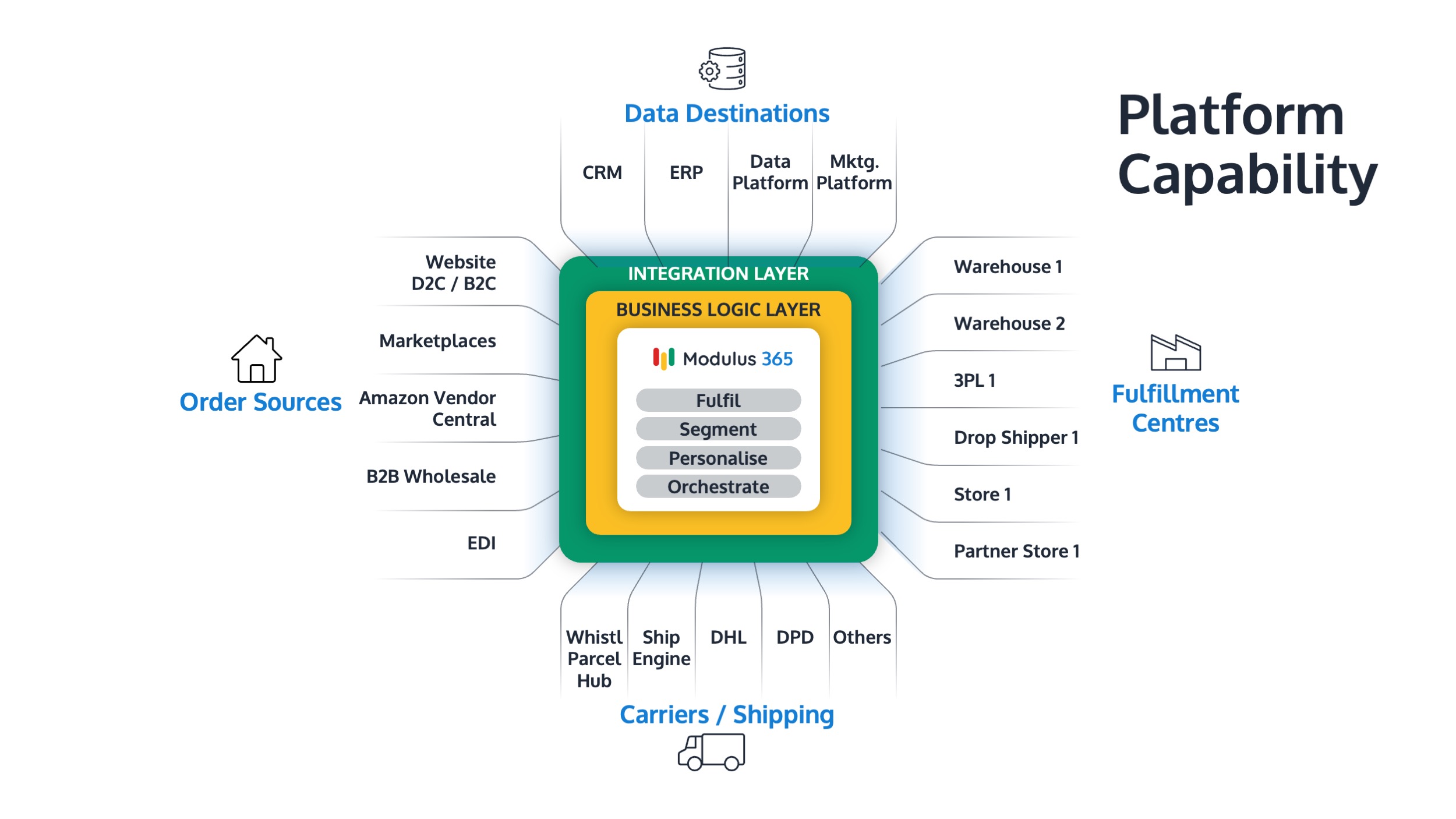


Order Management System for Sage ERP
As businesses grow across ecommerce, wholesale, marketplaces, and multiple fulfilment channels, managing orders directly inside Sage ERP can become increasingly difficult.
An order management system for Sage ERP helps businesses centralise order control, improve fulfilment accuracy, and orchestrate orders across channels, warehouses, carriers, and customers.
👉 Looking for OMS and WMS capability for Sage? Explore Modulus365 for Sage
What is an Order Management System for Sage ERP?
An order management system, or OMS, for Sage ERP is a system that helps manage orders from multiple channels and coordinate fulfilment activity with Sage.
Instead of handling every operational process directly inside the ERP, an OMS acts as a control layer for order capture, routing, allocation, fulfilment, and visibility.
Why Sage Businesses Need an OMS
Sage ERP systems are strong for financials, stock, purchasing, and business processes. However, growing businesses often need additional control when orders come from multiple channels.
- Ecommerce websites
- Marketplaces
- Wholesale customers
- B2B portals
- EDI orders
- Retail or field sales channels
An OMS helps bring these orders into a controlled fulfilment process.
OMS vs WMS: What is the Difference?
An OMS manages the lifecycle of an order, while a WMS manages the physical warehouse execution required to fulfil that order.
| System | Main Role | Typical Functions |
|---|---|---|
| OMS | Order control | Order capture, routing, allocation, fulfilment status |
| WMS | Warehouse execution | Picking, packing, bin locations, stock movements, dispatch |
| Fulfilment Platform | Combined operational layer | OMS, WMS, carrier integration, visibility, automation |
👉 Read our related guide: Warehouse Management System for Sage 200.
What Problems Does an OMS Solve for Sage Users?
- Orders spread across multiple sales channels
- Manual order entry and rekeying
- Limited visibility of order status
- Difficulty prioritising fulfilment
- Split shipments and stock allocation issues
- Disconnected warehouse and carrier workflows
These problems become more visible as businesses grow beyond simple order processing.
How Modulus365 Works as an OMS for Sage
Modulus365 provides order management and fulfilment capability for Sage businesses, helping teams control the full order journey from capture to dispatch.
- Centralise orders from multiple channels
- Coordinate fulfilment across warehouses and partners
- Connect order management with warehouse execution
- Integrate with carriers and shipping platforms
- Provide visibility across order status and fulfilment performance
Order Management for Sage 200 and Sage Intacct
Sage 200
Sage 200 users often need OMS capability when order volumes increase, ecommerce grows, or warehouse operations become more complex.
Sage Intacct
Sage Intacct users with product-based operations may need a connected fulfilment and order management layer to support physical stock, dispatch, and multi-channel fulfilment.
👉 You may also find our Sage Intacct Warehouse Management guide helpful.
What to Look for in an OMS for Sage ERP
- Multi-channel order capture
- Real-time stock visibility
- Order routing and allocation logic
- Warehouse and fulfilment integration
- Carrier and dispatch integration
- Returns management
- Operational reporting and dashboards
When Should You Add an OMS to Sage?
- You sell through multiple channels
- You manually rekey orders into Sage
- You struggle to track fulfilment status
- Your warehouse team lacks order visibility
- You need better control of stock allocation
- You want to scale fulfilment without adding admin headcount
Related Guides
- Best WMS for Sage 200
- Sage 200 Fulfilment Architecture Explained
- WMS Integration with Sage 200 & Sage Intacct
- Cloud WMS for Sage Intacct
- Modulus365 for Sage
Ready to Improve Order Management for Sage?
Modulus365 helps Sage businesses centralise order management, automate fulfilment, and gain visibility across warehouse and dispatch operations.
Frequently Asked Questions
Does Sage ERP include an order management system?
Sage ERP systems include order processing functionality, but businesses with complex multi-channel fulfilment often need a dedicated OMS or fulfilment platform.
What is the difference between order processing and order management?
Order processing usually handles sales order entry and transactions, while order management controls the full journey from order capture to fulfilment, dispatch, and visibility.
Can an OMS integrate with Sage 200 and Sage Intacct?
Yes, modern OMS and fulfilment platforms can integrate with Sage ERP systems to support order orchestration, stock visibility, fulfilment workflows, and reporting.