

Inventory Management for Sage 200
Sage 200 provides important stock control and ERP functionality, but growing businesses often need stronger inventory visibility across warehouses, sales channels, and fulfilment operations.
This guide explains how Sage 200 users can improve inventory management by connecting ERP stock control with warehouse automation, order orchestration, and fulfilment visibility.
👉 Need better stock visibility? Explore Modulus365 for Sage 200
What is Inventory Management for Sage 200?
Inventory management for Sage 200 involves tracking stock levels, stock movements, purchase orders, sales orders, and availability across the business.
However, when businesses scale across multiple warehouses, ecommerce platforms, marketplaces, or fulfilment channels, they often need additional warehouse and fulfilment systems to manage inventory more effectively.
Common Inventory Challenges for Sage 200 Users
- Stock discrepancies between systems
- Delayed stock updates
- Limited real-time warehouse visibility
- Manual stock adjustments
- Difficulty managing multiple channels
- Picking and dispatch errors affecting stock accuracy
These challenges can lead to overselling, stockouts, delayed orders, and reduced customer satisfaction.
Why Sage 200 Inventory Management Needs Operational Visibility
Good inventory management is not just about knowing what stock exists in the ERP. It also depends on what is happening physically in the warehouse.
For example, stock may be:
- Available to sell
- Allocated to an order
- Being picked
- Packed but not dispatched
- Awaiting return processing
- In transit between locations
Without operational visibility, inventory accuracy can quickly become unreliable.
How a WMS Improves Inventory Management for Sage 200
A warehouse management system adds real-time operational control around stock movement.
- Barcode scanning improves accuracy
- Bin locations improve stock organisation
- Picking workflows reduce errors
- Real-time updates improve stock visibility
- Multi-warehouse support improves control
- Returns workflows protect inventory accuracy
👉 Learn more in our Warehouse Management System for Sage 200 guide.
How Modulus365 Supports Inventory Management for Sage 200
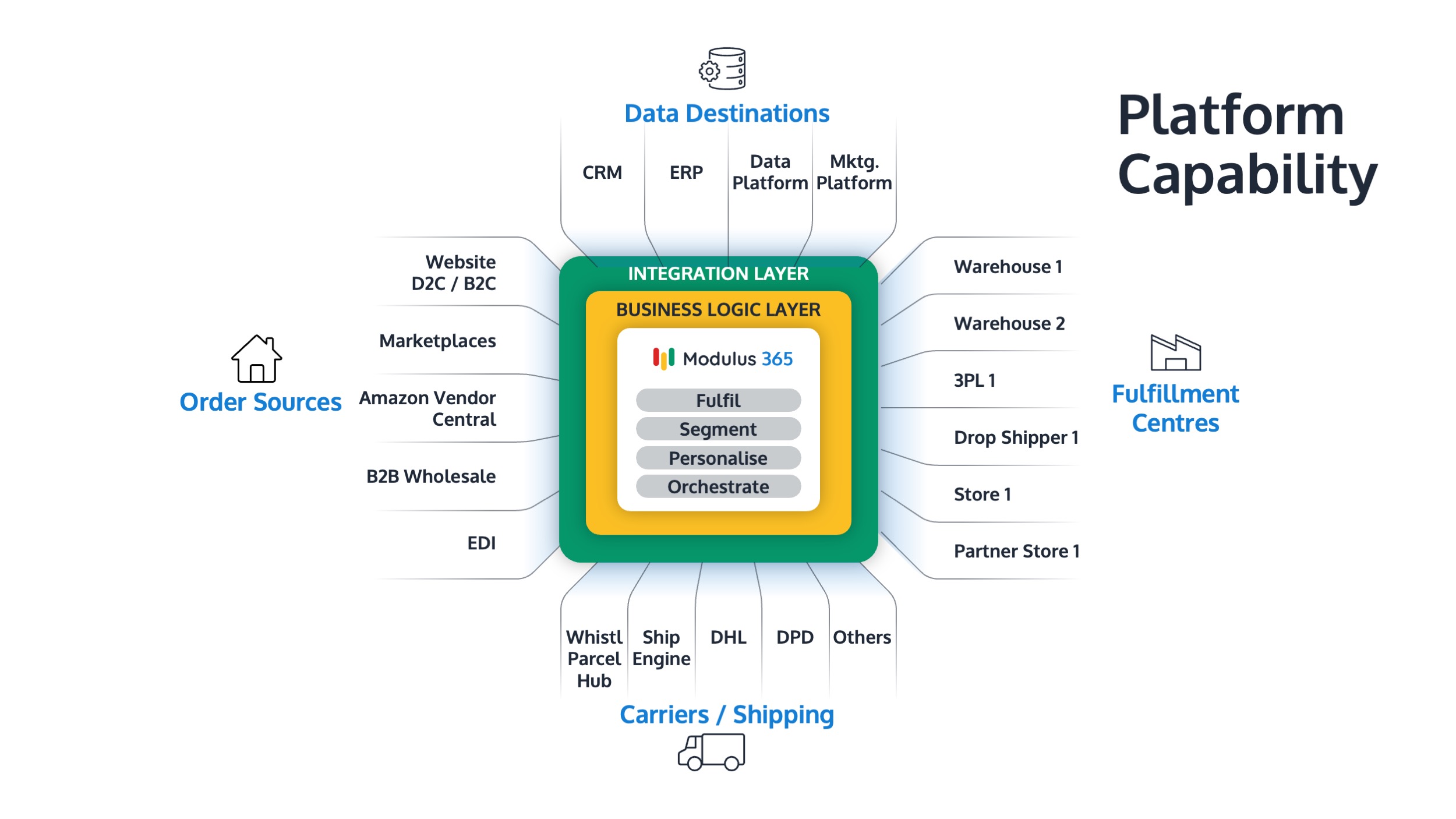
Modulus365 works alongside Sage 200 to improve inventory visibility, fulfilment control, and warehouse execution.
- Synchronises stock and order data with Sage 200
- Manages warehouse workflows using scanning and automation
- Improves stock visibility across fulfilment operations
- Supports ecommerce, marketplace, and carrier integrations
- Provides operational reporting and fulfilment insights
Inventory Management vs Warehouse Management
| Area | Inventory Management | Warehouse Management |
|---|---|---|
| Main focus | Stock visibility and control | Physical warehouse execution |
| Typical system | ERP | WMS or fulfilment platform |
| Key question | What stock do we have? | Where is stock and how is it moving? |
| Processes | Purchasing, stock levels, availability | Picking, packing, dispatch, returns |
When Should Sage 200 Users Improve Inventory Management?
- You are experiencing frequent stock discrepancies
- You sell across multiple channels
- You operate from more than one warehouse
- You rely on manual stock updates
- You struggle to trust available stock figures
- You want faster, more accurate fulfilment
Related Guides
- Best WMS for Sage 200
- Warehouse Management System for Sage 200
- Cloud WMS for Sage 200
- Does Sage 200 Have a WMS?
- Modulus365 for Sage
Ready to Improve Inventory Accuracy with Sage 200?
Modulus365 helps Sage 200 businesses improve stock visibility, reduce fulfilment errors, and manage inventory across growing warehouse operations.
Frequently Asked Questions
Does Sage 200 include inventory management?
Yes, Sage 200 includes stock control and inventory management features. However, growing warehouse operations often require additional fulfilment and warehouse management capability.
How can Sage 200 users improve stock accuracy?
Stock accuracy can be improved by connecting Sage 200 with barcode scanning, warehouse workflows, and real-time fulfilment visibility.
Do I need a WMS for inventory management with Sage 200?
If your business has complex warehouse operations, multiple channels, or frequent stock discrepancies, a WMS or fulfilment platform can significantly improve inventory control.