

Sage 200 Warehouse Automation
As order volumes grow, many Sage 200 businesses reach a point where manual warehouse processes become too slow, too error-prone, and too difficult to scale.
Warehouse automation helps Sage 200 users improve picking accuracy, reduce manual work, speed up dispatch, and gain better operational visibility across fulfilment processes.
👉 Looking to automate warehouse operations? Explore Modulus365 for Sage
What is Sage 200 Warehouse Automation?
Sage 200 warehouse automation refers to the use of connected warehouse systems, barcode scanning, fulfilment workflows, and real-time data synchronisation to reduce manual warehouse activity and improve operational control.
Instead of relying on paper pick lists, manual stock updates, and spreadsheet-based processes, businesses can use a WMS or fulfilment platform alongside Sage 200 to automate key warehouse tasks.
Why Sage 200 Businesses Need Warehouse Automation
Sage 200 provides important ERP and stock control functionality, but warehouse teams often need more operational capability when fulfilment becomes complex.
- Manual picking can create errors
- Paper-based workflows slow down dispatch
- Stock updates may lag behind warehouse activity
- Warehouse teams may lack real-time visibility
- Growing ecommerce and wholesale orders increase pressure
Warehouse automation helps reduce these issues by connecting physical warehouse activity with system-driven workflows.
Key Areas of Warehouse Automation
- Barcode scanning for accurate picking, packing, and stock movement
- Digital pick lists to replace paper-based processes
- Bin and location control for better stock organisation
- Automated order allocation to support faster fulfilment
- Carrier integration for dispatch and tracking updates
- Real-time stock updates between warehouse operations and Sage 200
How a WMS Supports Warehouse Automation for Sage 200
A warehouse management system helps automate physical warehouse processes while keeping stock and order information aligned with Sage 200.
For example, orders can be passed from Sage 200 into the warehouse system, picked using barcode scanning, packed at the bench, dispatched through carrier integration, and updated back into Sage 200.
👉 Learn more in our Warehouse Management System for Sage 200 guide.
How Modulus365 Automates Sage 200 Fulfilment
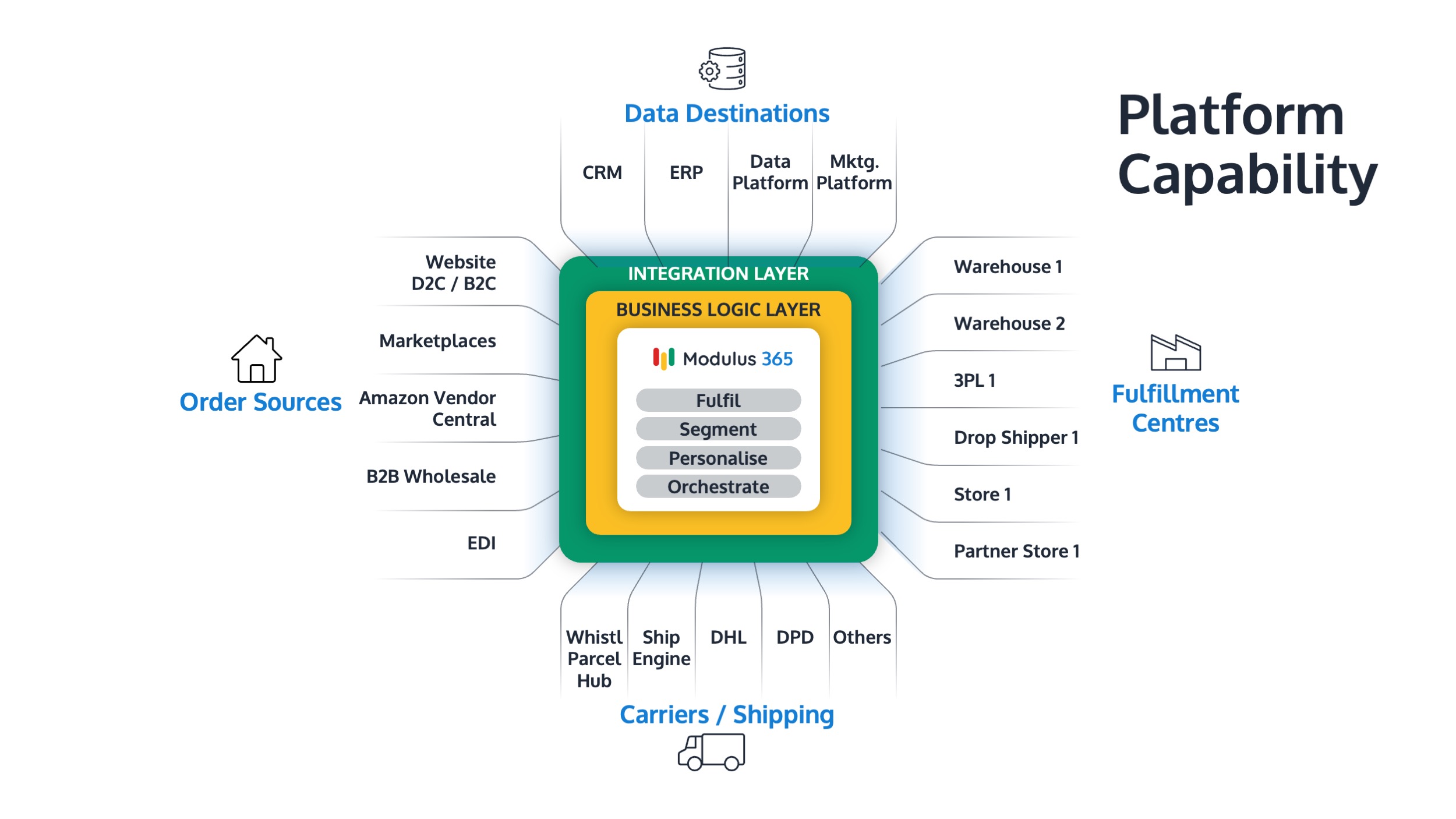
Modulus365 works alongside Sage 200 as a fulfilment operations platform, helping businesses automate warehouse and order fulfilment processes.
- Barcode-based warehouse workflows
- Order orchestration across sales channels
- Real-time stock and fulfilment visibility
- Carrier and shipping integrations
- Operational reporting and fulfilment insight
Benefits of Warehouse Automation
| Challenge | Automation Benefit |
|---|---|
| Picking errors | Barcode scanning improves accuracy |
| Slow dispatch | Digital workflows speed up fulfilment |
| Poor visibility | Real-time updates improve control |
| Manual stock adjustments | System-driven stock movements reduce admin |
| Growth pressure | Scalable workflows support higher order volumes |
When Should Sage 200 Users Automate Warehouse Operations?
- Order volumes are increasing
- Warehouse errors are becoming more frequent
- Stock accuracy is difficult to trust
- Paper-based picking is slowing the team down
- You are expanding into ecommerce, marketplaces, or multi-channel fulfilment
Related Guides
- Best WMS for Sage 200
- Cloud WMS for Sage 200
- Inventory Management for Sage 200
- Sage 200 Fulfilment Architecture Explained
- Modulus365 for Sage
Ready to Automate Sage 200 Warehouse Operations?
Modulus365 helps Sage 200 businesses automate picking, packing, dispatch, stock visibility, and fulfilment workflows.
Frequently Asked Questions
Can Sage 200 automate warehouse operations?
Sage 200 provides ERP and stock control functionality, but dedicated warehouse automation usually requires a connected WMS or fulfilment platform.
What is the best way to automate a Sage 200 warehouse?
The best approach is to connect Sage 200 with a warehouse management or fulfilment platform that supports barcode scanning, digital workflows, and real-time stock visibility.
Does warehouse automation improve stock accuracy?
Yes. Barcode scanning, system-driven stock movements, and real-time updates can significantly improve stock accuracy across warehouse operations.