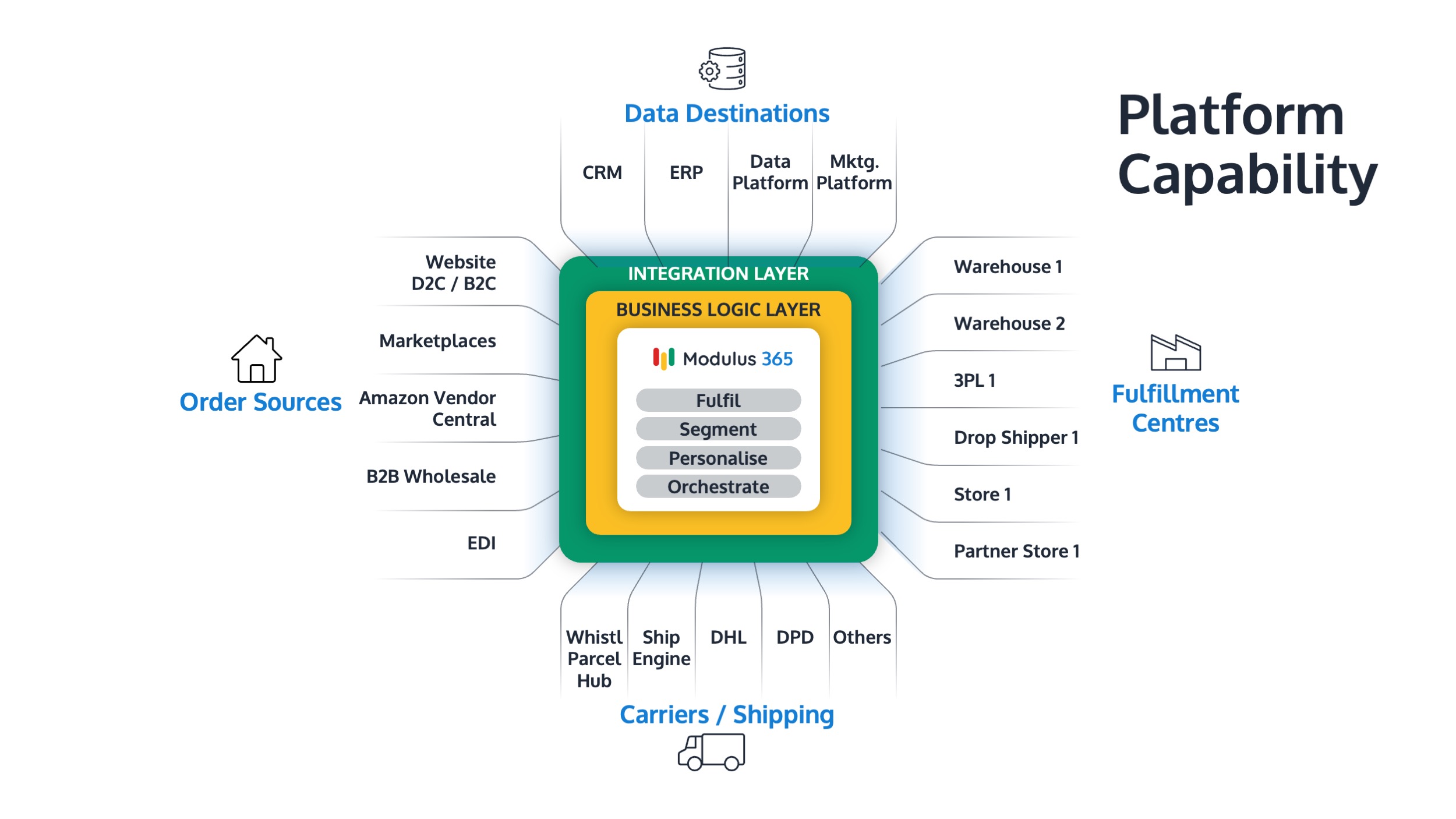


Sage 200 Fulfilment Architecture Explained
Modern fulfilment rarely happens inside one system. For growing Sage 200 businesses, fulfilment usually involves ERP, warehouse systems, ecommerce platforms, marketplaces, carriers, and sometimes 3PL providers.
This guide explains how Sage 200 fulfilment architecture works and how businesses can design a scalable setup for warehouse and order operations.
👉 Need a modern fulfilment layer for Sage? Explore Modulus365 for Sage
What is Sage 200 Fulfilment Architecture?
Sage 200 fulfilment architecture describes how Sage 200 connects with the systems used to manage orders, warehouse operations, inventory visibility, shipping, and customer fulfilment.
In a modern setup, Sage 200 usually remains the ERP and financial system, while a WMS, OMS, or fulfilment platform manages operational execution.
Why Fulfilment Architecture Matters
Without a clear architecture, businesses often end up with disconnected systems, manual workarounds, duplicate data entry, and poor visibility.
- Orders may sit across multiple platforms
- Stock may not update quickly enough
- Warehouse teams may work from incomplete information
- Finance teams may not have accurate fulfilment data
- Customer service teams may lack dispatch visibility
A well-designed fulfilment architecture helps each system do the job it is best suited for.
Typical Sage 200 Fulfilment Architecture
A typical fulfilment architecture may look like this:
Sage 200 → Fulfilment Platform → Warehouse → Carrier → Customer
In this model, Sage 200 manages ERP and finance processes, while the fulfilment platform manages operational workflows such as order orchestration, picking, packing, dispatch, and stock visibility.
Core Systems in the Architecture
1. Sage 200
Sage 200 acts as the ERP system, managing financials, sales orders, purchase orders, stock records, and business reporting.
2. OMS
An order management system manages orders from multiple channels and helps orchestrate fulfilment decisions.
3. WMS
A warehouse management system manages warehouse execution, including picking, packing, stock movement, bin locations, and dispatch.
4. Ecommerce and Marketplaces
Sales channels such as ecommerce platforms and marketplaces feed orders into the fulfilment process.
5. Carriers and Logistics Providers
Carrier integrations support shipping labels, tracking, dispatch updates, and customer communication.
Where Modulus365 Fits
Modulus365 can act as the fulfilment operations layer between Sage 200 and the wider commerce and warehouse ecosystem.
- Connects Sage 200 with warehouse operations
- Orchestrates orders across sales channels
- Supports warehouse scanning and fulfilment workflows
- Connects with carriers and logistics providers
- Provides operational visibility across fulfilment
👉 For a practical overview, read our WMS Integration with Sage 200 & Sage Intacct guide.
Why Not Run Everything Inside Sage 200?
Sage 200 is a strong ERP, but warehouse and fulfilment execution often require specialist operational workflows.
- Barcode scanning
- Digital picking
- Carrier integration
- Returns workflows
- Multi-channel order routing
- Real-time fulfilment visibility
Trying to force all operational execution into the ERP can create complexity and limit scalability.
ERP-Centric vs Fulfilment-Layer Architecture
| Area | ERP-Centric Setup | Fulfilment-Layer Setup |
|---|---|---|
| Order handling | Mainly inside ERP | Managed across channels and warehouse workflows |
| Warehouse execution | Manual or limited | Managed through WMS/fulfilment platform |
| Carrier integration | Often separate | Connected into fulfilment flow |
| Scalability | Can become constrained | Designed for operational growth |
| Visibility | ERP reporting | Real-time fulfilment visibility |
Signs Your Fulfilment Architecture Needs Improvement
- You rely on spreadsheets between systems
- Orders require manual rekeying
- Stock data is not trusted
- Warehouse teams lack real-time visibility
- Shipping and tracking updates are disconnected
- You struggle to scale during peak periods
Related Guides
- Sage 200 Warehouse Automation
- Warehouse Management System for Sage 200
- Order Management System for Sage ERP
- Cloud WMS for Sage 200
- Modulus365 for Sage
Ready to Build a Scalable Sage 200 Fulfilment Architecture?
Modulus365 helps Sage 200 businesses connect ERP, warehouse operations, ecommerce channels, carriers, and fulfilment visibility into one scalable operational layer.
Frequently Asked Questions
What is fulfilment architecture?
Fulfilment architecture is the way ERP, warehouse, order management, ecommerce, carrier, and logistics systems connect to manage order fulfilment.
Should Sage 200 manage warehouse execution?
Sage 200 can manage stock and ERP processes, but complex warehouse execution is usually better handled by a dedicated WMS or fulfilment platform.
How does Modulus365 fit with Sage 200?
Modulus365 works alongside Sage 200 as a fulfilment operations layer, managing warehouse workflows, order orchestration, integrations, and operational visibility.