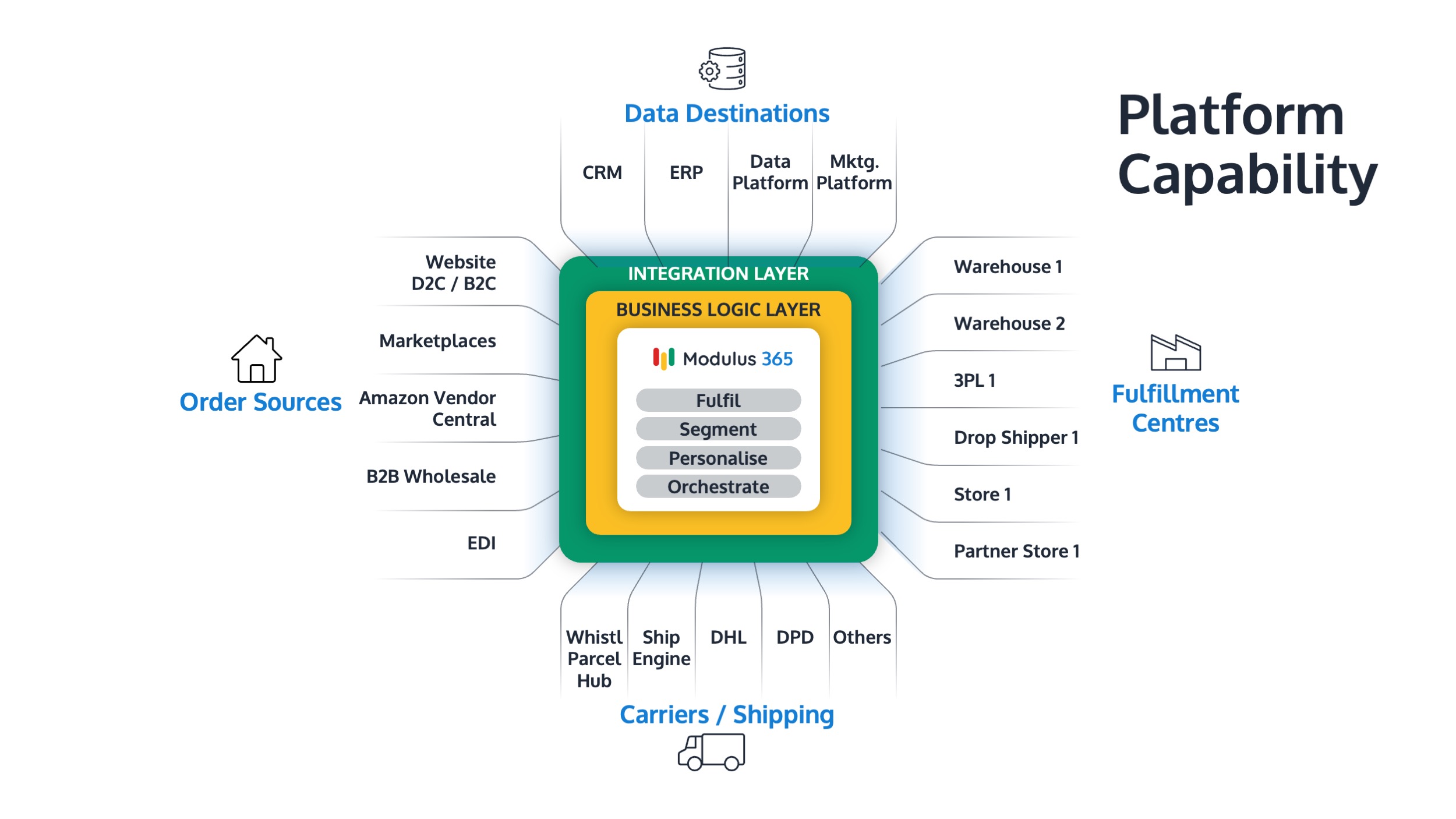


As businesses grow, managing warehouse operations directly within Sage 200 can quickly become inefficient. Manual processes, stock discrepancies, and limited visibility often slow down fulfilment.
A dedicated warehouse management system (WMS) helps Sage 200 users automate picking, improve stock accuracy, and scale fulfilment operations with confidence.
👉 Want to see how it works? Explore Modulus365 for Sage 200
What is a Warehouse Management System for Sage 200?
A warehouse management system (WMS) for Sage 200 is a solution that integrates with the ERP to manage warehouse operations such as picking, stock control, inventory tracking, and dispatch processes.
Modern solutions go further by providing fulfilment automation, real-time inventory visibility, and integration with ecommerce platforms, carriers, and marketplaces.
Why Sage 200 Alone is Not Enough for Warehouse Management
While Sage 200 offers strong financial and stock control capabilities, it is not designed to manage complex warehouse operations at scale.
- Manual picking and packing processes
- Limited bin and location tracking
- Lack of real-time stock visibility
- No native barcode scanning workflows
- Difficulty handling multi-channel fulfilment
These limitations become more noticeable as order volumes increase and operations become more complex.
Benefits of Implementing a WMS with Sage 200
- Improved stock accuracy through real-time updates
- Faster picking and packing with barcode scanning
- Better warehouse organisation with bin-level tracking
- Reduced errors in fulfilment processes
- Scalable operations as order volumes grow
A WMS allows businesses to move from reactive warehouse management to controlled and optimised operations.
Types of Warehouse Management Systems for Sage 200
1. Traditional Sage Add-ons
These extend Sage 200 with warehouse features but are often limited to ERP-based workflows.
2. Standalone WMS Systems
Independent warehouse systems that integrate with Sage but may require additional middleware.
3. Fulfilment Platforms (Modern Approach)
Platforms like Modulus365 combine warehouse management, order orchestration, and fulfilment automation into one system.
How Modulus365 Enhances Warehouse Management for Sage 200
Modulus365 acts as the fulfilment layer between Sage 200 and your warehouse operations.
- Synchronises orders, stock, and customers with Sage 200
- Provides mobile barcode scanning and warehouse automation
- Supports multi-warehouse operations
- Integrates with ecommerce platforms and marketplaces
- Connects with carriers for shipping and tracking
This enables businesses to run efficient, scalable warehouse operations without overloading their ERP.
When Should You Implement a WMS for Sage 200?
- Order volumes are increasing
- Warehouse errors are becoming frequent
- Stock discrepancies are common
- Manual processes are slowing operations
- You are expanding into ecommerce or multiple sales channels
If these challenges sound familiar, a WMS can significantly improve operational performance.
Related Guides
Ready to Optimise Your Warehouse Operations?
Modulus365 helps Sage 200 businesses automate warehouse workflows, improve stock accuracy, and scale fulfilment operations efficiently.
Frequently Asked Questions
Does Sage 200 include a warehouse management system?
Sage 200 includes basic stock control but does not provide a full WMS. Most businesses require a dedicated system.
Can a WMS integrate with Sage 200?
Yes, modern WMS platforms integrate with Sage 200 to synchronise stock, orders, and fulfilment processes.
What is the best warehouse management system for Sage 200?
The best WMS depends on your needs, but modern fulfilment platforms like Modulus365 offer the most flexibility and scalability.