

OMS vs WMS: What’s the Difference?
OMS and WMS are two of the most important systems in modern fulfilment operations, but they do very different jobs.
An OMS, or Order Management System, manages the order journey. A WMS, or Warehouse Management System, manages physical warehouse execution.
This guide explains the difference between OMS and WMS, when each system is needed, and why growing businesses often need both working together.
What is the Difference Between OMS and WMS?
The main difference between OMS and WMS is that an OMS manages orders, while a WMS manages warehouse activity.
An OMS controls how orders are received, prioritised, allocated, routed, and tracked. A WMS controls how products are picked, packed, moved, counted, and dispatched inside the warehouse.
| System | Main Purpose | Typical Users |
|---|---|---|
| OMS | Manage order flow across channels | Operations, customer service, ecommerce, wholesale teams |
| WMS | Manage warehouse execution | Warehouse managers, pickers, packers, dispatch teams |
What is an OMS?
An Order Management System helps businesses manage customer orders from the moment they are received through to fulfilment, dispatch, and status updates.
An OMS is especially useful when orders come from multiple channels, such as:
- Ecommerce websites
- Marketplaces
- Wholesale customers
- B2B portals
- Retail stores
- EDI channels
The OMS helps decide how orders should be processed, where they should be fulfilled from, and how their status should be tracked.
What Does an OMS Do?
An OMS typically supports:
- Order capture from multiple sales channels
- Order validation and prioritisation
- Stock allocation
- Order routing to warehouses, stores, 3PLs, or suppliers
- Split shipment handling
- Order status visibility
- Customer service visibility
- Returns initiation
In simple terms, an OMS answers the question: what should happen to this order?
What is a WMS?
A Warehouse Management System helps businesses manage the physical movement of stock inside the warehouse.
A WMS is used by warehouse teams to control receiving, putaway, picking, packing, stock movements, dispatch, and returns processing.
What Does a WMS Do?
A WMS typically supports:
- Goods receiving
- Putaway
- Bin and location management
- Barcode scanning
- Picking workflows
- Packing checks
- Stock movements
- Cycle counting
- Dispatch confirmation
- Returns handling
In simple terms, a WMS answers the question: how do we physically fulfil this order accurately?
OMS vs WMS: Side-by-Side Comparison
| Area | OMS | WMS |
|---|---|---|
| Primary focus | Order flow | Warehouse execution |
| Manages | Orders, routing, allocation, status | Picking, packing, stock movement, dispatch |
| Used by | Ops, ecommerce, customer service | Warehouse teams |
| Answers | Where should this order go? | How do we pick and ship it? |
| Best for | Multi-channel order control | Warehouse accuracy and productivity |
Do You Need an OMS, a WMS, or Both?
The answer depends on the complexity of your business.
You may need an OMS if:
- You sell through multiple channels
- You need to route orders between warehouses, stores, 3PLs, or suppliers
- You struggle to see order status clearly
- You handle split shipments or back orders
- Your customer service team needs better order visibility
You may need a WMS if:
- You have picking errors
- Your warehouse relies on paper or spreadsheets
- You need barcode scanning
- You manage multiple bin locations
- Stock accuracy is difficult to trust
- Dispatch is slow or error-prone
You may need both if:
- You sell across multiple channels and operate a busy warehouse
- You need better stock allocation and picking accuracy
- You want to scale fulfilment without increasing manual admin
- You need a connected flow from order capture to dispatch
How OMS and WMS Work Together
In a connected fulfilment operation, the OMS and WMS work together.
The OMS receives and manages the order. It decides where the order should be fulfilled from. The WMS then manages the physical process of picking, packing, and dispatching the order.
Example flow:
Order received → OMS validates and allocates → WMS picks and packs → Carrier dispatches → Customer receives tracking update
This joined-up flow helps reduce manual work, errors, delays, and customer service issues.
Where ERP Fits in OMS and WMS
Many businesses also use an ERP system for financials, purchasing, stock records, and reporting.
The ERP remains important, but it should not always be expected to manage every fulfilment workflow directly.
| System | Role |
|---|---|
| ERP | Financials, stock records, purchasing, invoices, reporting |
| OMS | Order orchestration, allocation, routing, status visibility |
| WMS | Warehouse execution, scanning, picking, packing, dispatch |
For growing businesses, the strongest architecture is often ERP + OMS + WMS working together in a controlled fulfilment flow.
What is a Fulfilment Platform?
A fulfilment platform combines key OMS and WMS capabilities with inventory visibility, carrier integration, and operational reporting.
Rather than running separate disconnected systems, a fulfilment platform helps teams manage the full operational journey from order capture to dispatch.
This is especially useful for businesses that want one connected fulfilment layer across sales channels, warehouses, carriers, and ERP systems.
Where Modulus365 Fits
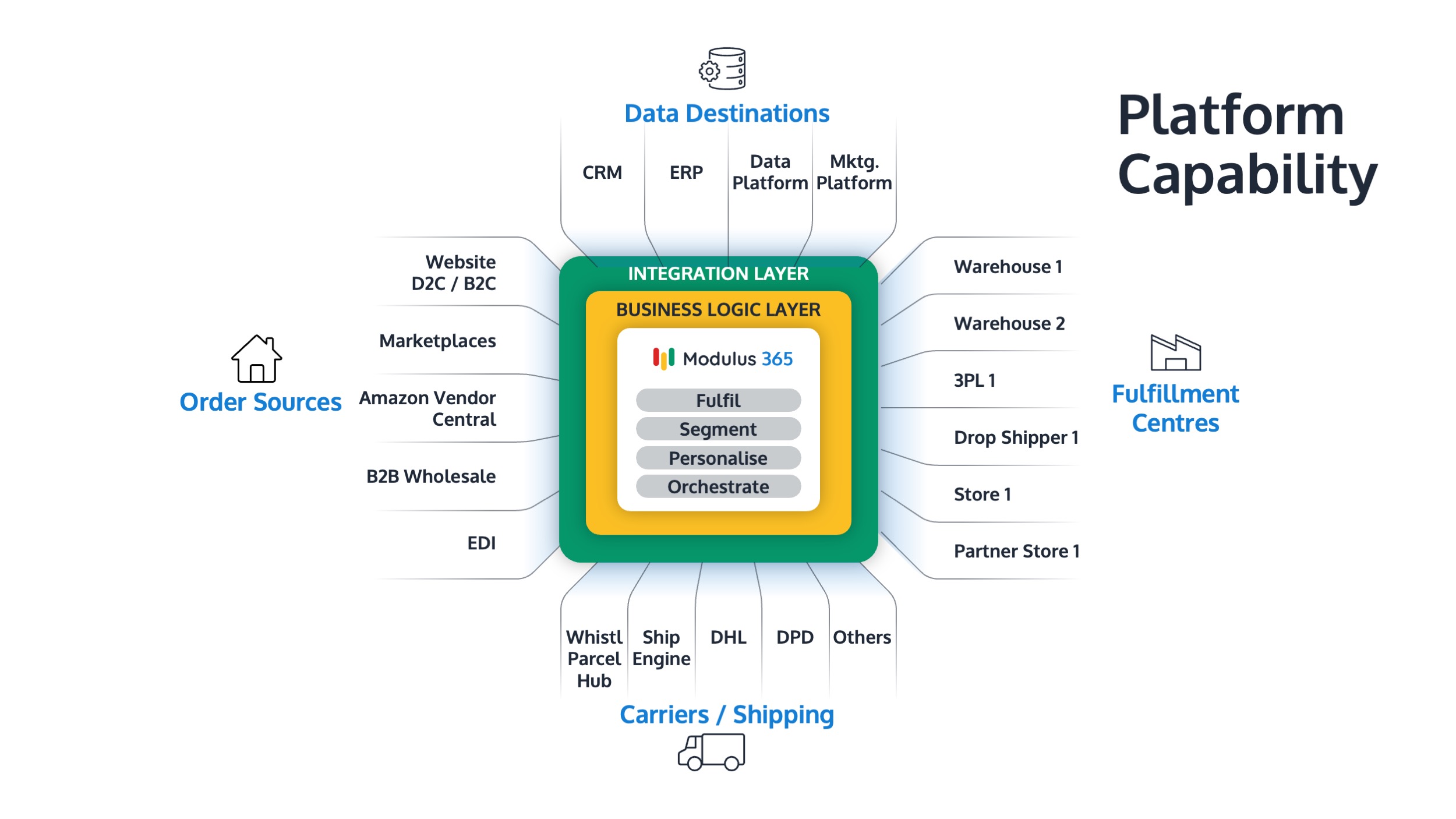
Modulus365 combines OMS and WMS capability into a fulfilment operations platform.
It helps businesses manage order flow, warehouse workflows, inventory visibility, carrier integrations, and fulfilment performance in one connected system.
For Sage businesses, Modulus365 can work alongside the ERP as the operational fulfilment layer.
👉 Learn more about Modulus365 for Sage.
Related FOA Guides
OMS and WMS are two key parts of fulfilment operations. These guides explain how order flow, warehouse execution, inventory visibility, and performance measurement work together:
- What is Fulfilment Operations?
- What is Order Orchestration?
- How to Improve Warehouse Picking Accuracy
- Inventory Accuracy: Why It Breaks and How to Fix It
- Fulfilment KPIs Every Operations Leader Should Track
- How to Reduce Fulfilment Cost Per Order
- Returns Management Best Practices
Ready to Connect Order Management and Warehouse Operations?
If orders, stock, warehouse workflows, and dispatch processes are becoming harder to manage, Modulus365 can help bring OMS and WMS capability into one connected fulfilment platform.
Frequently Asked Questions
What is the difference between OMS and WMS?
An OMS manages order flow, allocation, routing, and status visibility. A WMS manages warehouse execution such as picking, packing, stock movements, and dispatch.
Do I need both OMS and WMS?
You may need both if you sell through multiple channels and operate warehouse fulfilment. The OMS controls the order journey, while the WMS controls the warehouse process.
Can an ERP replace an OMS or WMS?
An ERP can manage financials, stock records, and order processing, but growing fulfilment operations often need specialist OMS and WMS capability.
Is a fulfilment platform the same as an OMS or WMS?
A fulfilment platform often combines OMS and WMS capabilities with inventory visibility, carrier integration, automation, and operational reporting.
Which system should a growing business implement first?
If the biggest problem is multi-channel order control, start with OMS capability. If the biggest problem is warehouse accuracy and productivity, start with WMS capability. Many growing businesses eventually need both.