

How to Prevent Overselling Across Sales Channels
Overselling happens when a business sells more stock than it can actually fulfil. It is one of the most common inventory problems for growing ecommerce, wholesale, marketplace, and multi-channel businesses.
When stock is shared across several sales channels, preventing overselling becomes harder. The same product may be available on your ecommerce website, marketplaces, B2B portal, wholesale order book, telesales team, and ERP at the same time.
This guide explains why overselling happens, how to prevent it, and how better stock visibility, allocation rules, and fulfilment systems can protect customer experience.
What is Overselling?
Overselling means accepting more orders for a product than the business can fulfil from available stock.
For example, your system may show 20 units available, but 15 have already been allocated to existing orders and 5 are damaged or quarantined. If another channel sells those 20 units, the business has oversold.
Overselling usually happens when stock availability is not accurate, not updated quickly enough, or not calculated correctly across systems.
To understand the difference between stock types, read: Available Stock vs Physical Stock vs Allocated Stock.
Why Overselling Matters
Overselling damages both customer experience and operational efficiency.
It can lead to:
- Cancelled orders
- Delayed dispatch
- Customer complaints
- Marketplace penalties
- Lost revenue
- Refunds and goodwill costs
- Manual customer service work
- Emergency stock transfers
- Unnecessary split shipments
- Loss of trust in stock data
Overselling is not only a stock issue. It affects fulfilment operations, customer service, marketplace performance, and profitability.
Why Overselling Happens
Overselling usually happens when order demand moves faster than stock visibility.
Common causes include:
- Stock updates are delayed between systems
- Sales channels use physical stock instead of available stock
- Allocated stock is not deducted quickly enough
- Returns are added back before inspection
- Damaged or quarantined stock is treated as saleable
- Multiple channels sell from the same stock pool
- Manual stock adjustments are not controlled
- Warehouse stock records are inaccurate
- Marketplace stock buffers are not used
- Back orders are not managed properly
Preventing overselling starts with reliable inventory accuracy. Read: Inventory Accuracy: Why It Breaks and How to Fix It.
1. Use Available Stock, Not Physical Stock
The most important rule is to sell from available stock, not simply physical stock.
Physical stock is the total quantity physically in the warehouse. Available stock is the quantity that can still be sold after allocated, damaged, quarantined, reserved, or unavailable stock has been removed.
A simple formula is:
Available Stock = Physical Stock – Allocated Stock – Unavailable Stock
If sales channels use physical stock, they may show stock that has already been promised to other orders.
2. Keep Stock Updates Close to Real Time
Overselling often happens when stock updates between systems are too slow.
For example, your ecommerce store may sell an item, but the marketplace still thinks the same stock is available because updates are delayed.
Review how quickly stock changes are sent between:
- ERP
- WMS
- OMS
- Ecommerce platform
- Marketplaces
- B2B portal
- 3PL systems
- Warehouse systems
The more channels you sell through, the more important stock synchronisation becomes.
3. Use Stock Buffers
A stock buffer holds back a small quantity of stock from being advertised for sale.
For example, if you physically have 50 units, you may choose to show only 45 units as available online. The remaining 5 units act as a buffer to protect against stock discrepancies, delayed updates, or last-minute order conflicts.
Stock buffers are especially useful for:
- Fast-moving products
- Marketplace listings
- Products with frequent discrepancies
- High-return products
- Products sold across several channels
- Peak season periods
Buffers should be reviewed regularly. Too large a buffer can reduce sales unnecessarily; too small a buffer may not protect against overselling.
4. Define Channel-Level Stock Rules
Not every sales channel should always have access to the same stock quantity.
For example, you may want to reserve stock for wholesale customers, protect marketplace SLAs, or limit stock shown on certain channels during peak demand.
Channel-level rules may include:
- Reserving stock for key accounts
- Limiting stock shown on marketplaces
- Prioritising B2B orders
- Holding safety stock for replacements
- Allocating stock by region or warehouse
- Restricting fast-moving products during promotions
These rules help prevent one channel from consuming stock that another channel needs.
5. Allocate Stock When Orders Are Accepted
Stock allocation protects existing customer promises.
When an order is accepted, the required stock should be reserved so it cannot be sold again elsewhere.
Allocation rules should consider:
- Order status
- Payment status
- Delivery promise
- Customer priority
- Sales channel
- Warehouse location
- Back order rules
- Fraud or credit hold status
If stock is not allocated properly, the same product may be promised to multiple customers.
Allocation is a key part of order orchestration.
6. Separate Damaged, Quarantined and Returned Stock
Stock that physically exists should not automatically be treated as available.
Returned goods, damaged stock, quarantined items, samples, and inspection stock should be clearly separated from saleable stock.
Use stock statuses such as:
- Available
- Allocated
- Damaged
- Quarantined
- Awaiting inspection
- Returned
- Reserved
- In transit
This is especially important for returns. Returned products should not be added back into available stock until they have been inspected and approved for resale.
Related guide: Returns Management Best Practices.
7. Improve Warehouse Stock Accuracy
Overselling is much harder to prevent if warehouse stock is unreliable.
Common warehouse causes include:
- Incorrect receiving
- Poor putaway discipline
- Unrecorded stock movements
- Picking errors
- Returns not processed properly
- Manual adjustments without reason codes
- Failed cycle counting
Cycle counting can help keep stock accuracy under control throughout the year. Read: Cycle Counting vs Annual Stock Takes.
8. Manage Back Orders Clearly
Back orders can be useful, but only when they are controlled.
If the business accepts orders for stock that is not currently available, customers and internal teams need clear expectations.
Back order rules should define:
- Which products can be back ordered
- Which channels allow back orders
- Expected replenishment date
- Customer communication rules
- Whether part shipment is allowed
- When orders should be cancelled or refunded
Without clear back order rules, overselling can turn into backlog and customer service pressure.
Related guide: Backlog Management: How to Recover Without Panic.
9. Avoid Manual Stock Adjustments Without Control
Manual stock adjustments can hide the real cause of inventory problems.
If teams adjust stock without reason codes or audit trails, the business may not understand why stock is changing.
Every adjustment should ideally record:
- SKU
- Location
- Quantity changed
- Reason code
- User
- Date and time
- Related order or process where relevant
Reducing uncontrolled adjustments improves confidence in available stock.
10. Review Stock Rules Before Peak Season
Overselling risk increases during peak periods because stock moves faster, order volume increases, and sales channels compete for the same inventory.
Before peak trading, review:
- Fast-moving SKUs
- Marketplace stock buffers
- Channel-level availability rules
- Back order settings
- Stock sync frequency
- Warehouse stock accuracy
- Returns processing rules
- Safety stock levels
For wider peak planning guidance, read: How to Manage Peak Season Fulfilment.
Overselling Prevention Checklist
| Area | Action |
|---|---|
| Stock definition | Use available stock, not physical stock, for sales channels |
| Stock sync | Keep stock updates as close to real time as possible |
| Allocation | Reserve stock when orders are accepted |
| Buffers | Use safety stock buffers for high-risk products and channels |
| Returns | Inspect returned goods before making them available |
| Damaged stock | Separate damaged and quarantined stock from available stock |
| Back orders | Define clear rules for when back orders are allowed |
| Cycle counts | Regularly check fast-moving and problem SKUs |
How Technology Helps Prevent Overselling
Preventing overselling becomes much easier when order management, warehouse activity, inventory visibility, and sales channels are connected.
A fulfilment platform can support:
- Available stock calculations
- Stock allocation rules
- Multi-channel stock synchronisation
- Marketplace stock buffers
- Warehouse stock visibility
- Barcode scanning
- Returns stock statuses
- Back order controls
- Exception reporting
To understand how order and warehouse systems work together, read: OMS vs WMS: What’s the Difference?.
How Modulus365 Helps Prevent Overselling
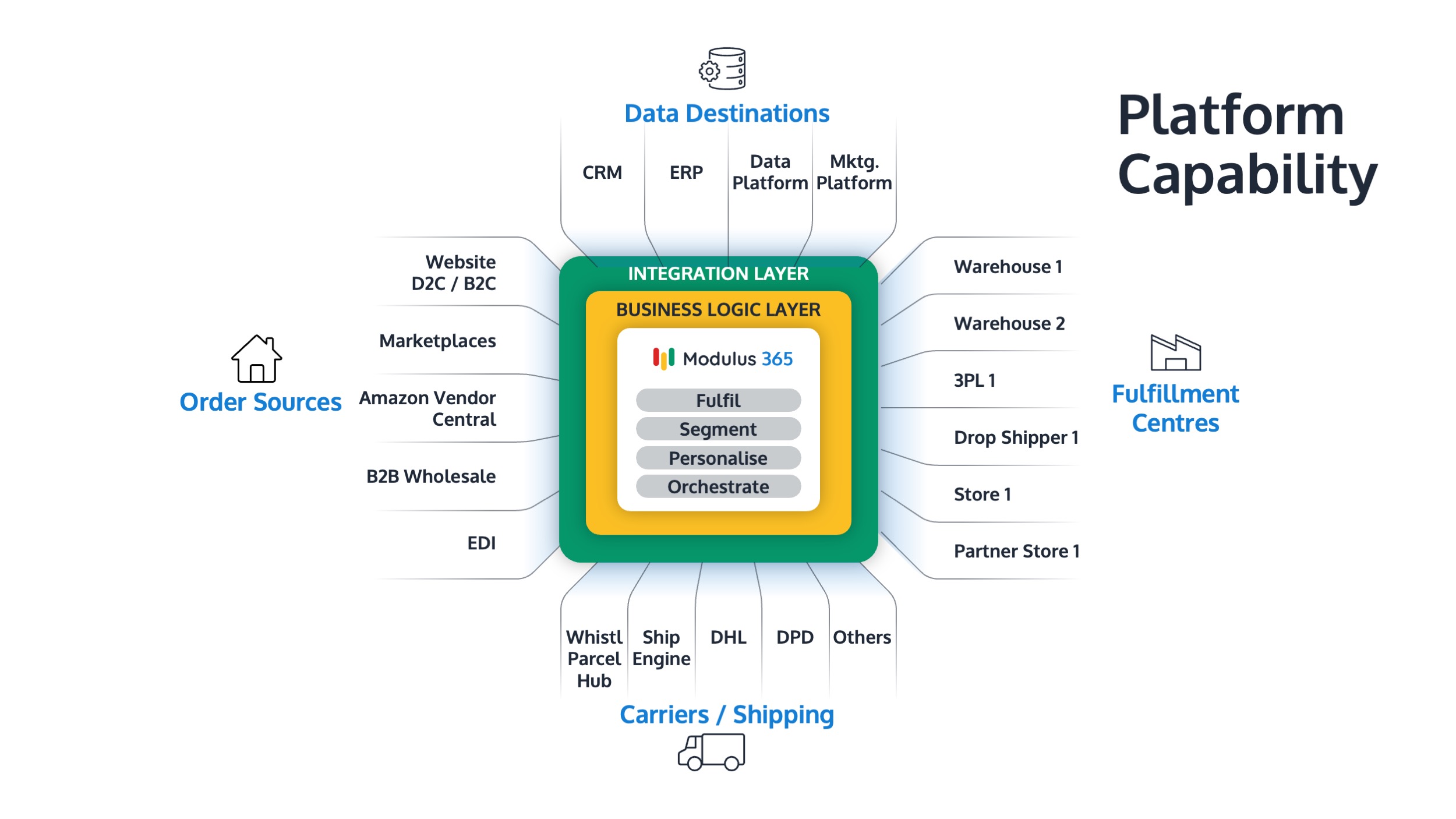
Modulus365 helps businesses connect orders, inventory, warehouse workflows, sales channels, carrier integrations, returns processes, and fulfilment reporting.
By improving available stock visibility, allocation rules, and operational control, Modulus365 helps businesses reduce overselling risk across ecommerce, marketplace, wholesale, and B2B channels.
For Sage businesses, Modulus365 can work alongside the ERP as the fulfilment operations layer.
👉 Learn more about Modulus365 for Sage.
Related FOA Guides
Preventing overselling depends on accurate available stock, inventory accuracy, allocation rules, channel visibility, and fulfilment control. These guides explain the key connected areas:
- Available Stock vs Physical Stock vs Allocated Stock
- Inventory Accuracy: Why It Breaks and How to Fix It
- Multi-Channel Fulfilment for Growing Businesses
- What is Order Orchestration?
- What is Fulfilment Automation?
- Backlog Management: How to Recover Without Panic
- Stock Replenishment Best Practices for Fulfilment Teams
- How to Manage Peak Season Fulfilment
Ready to Reduce Overselling Risk?
If overselling, failed picks, stock discrepancies, or channel stock conflicts are creating fulfilment problems, Modulus365 can help connect order flow, inventory visibility, warehouse activity, and fulfilment reporting into one controlled platform.
Frequently Asked Questions
What is overselling?
Overselling happens when a business accepts more orders for a product than it can fulfil from available stock.
What causes overselling?
Overselling is usually caused by delayed stock updates, poor inventory accuracy, weak allocation rules, selling from physical stock instead of available stock, or multiple channels sharing the same stock pool.
How can businesses prevent overselling?
Businesses can prevent overselling by using available stock calculations, allocating stock when orders are accepted, keeping stock updates current, using stock buffers, and separating unavailable stock from saleable stock.
What is a stock buffer?
A stock buffer is a small quantity of stock held back from sales channels to protect against stock discrepancies, delayed updates, or sudden order conflicts.
Why does overselling happen across multiple sales channels?
Overselling across multiple channels happens when ecommerce, marketplace, wholesale, B2B, ERP, and warehouse systems do not share accurate stock availability quickly enough.