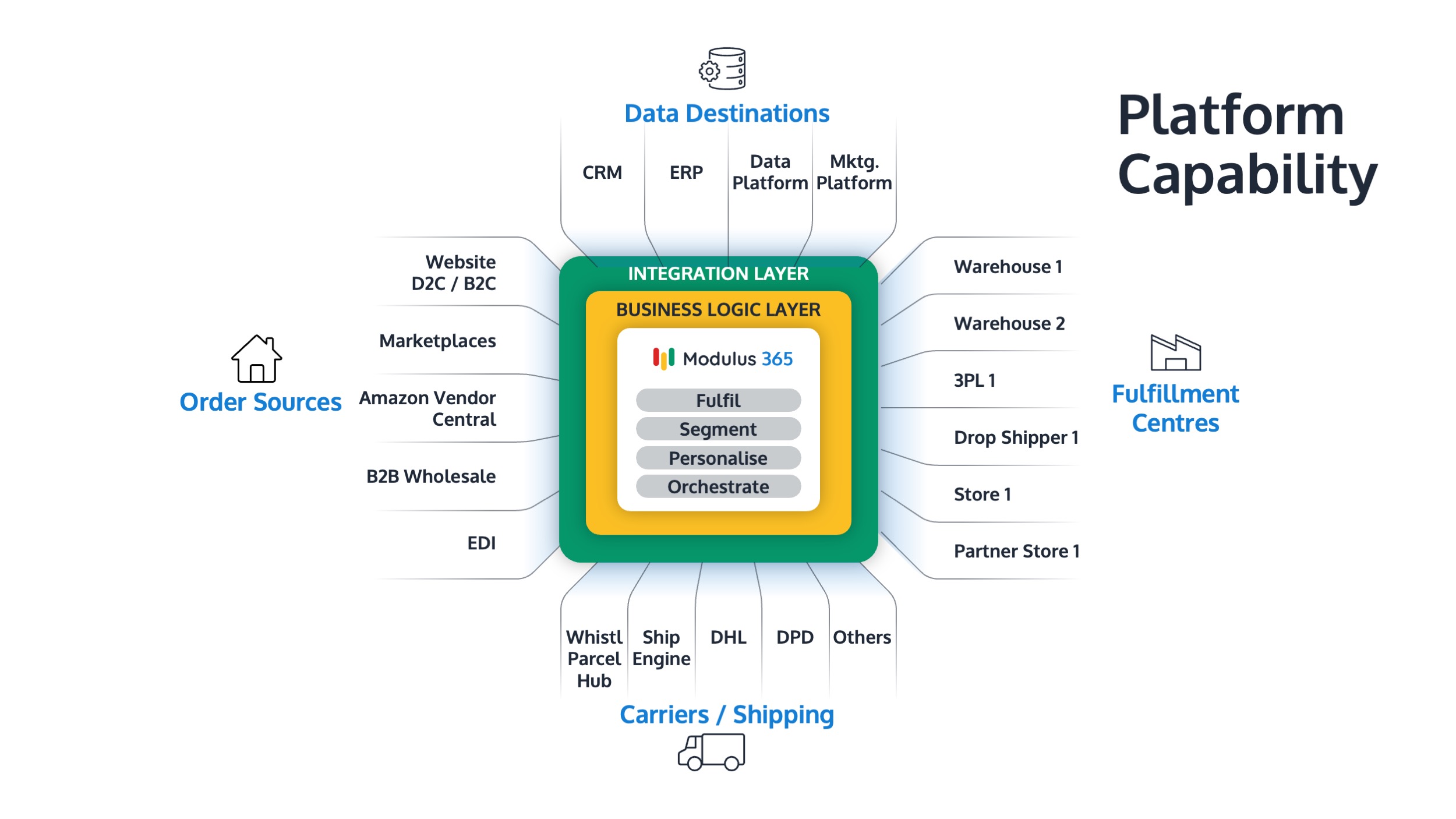


What is Fulfilment Automation?
Fulfilment automation is the use of systems, workflows, rules, scanning, integrations, and operational data to reduce manual work across the order fulfilment process.
For growing businesses, fulfilment automation helps teams process orders faster, reduce errors, improve stock accuracy, protect service levels, and scale without relying on constant manual intervention.
This guide explains what fulfilment automation means, which processes can be automated, and how businesses can apply automation across order management, warehouse operations, inventory, carriers, and returns.
What Does Fulfilment Automation Mean?
Fulfilment automation means using technology and process rules to automate repetitive, manual, or error-prone tasks involved in getting an order from purchase to delivery.
It can include:
- Importing orders from sales channels
- Allocating stock automatically
- Prioritising orders by fulfilment rules
- Creating digital pick tasks
- Using barcode scanning to validate products
- Generating carrier labels
- Sending dispatch and tracking updates
- Updating inventory after picking, packing, dispatch, and returns
- Reporting on fulfilment performance
Fulfilment automation is part of wider fulfilment operations.
Why Fulfilment Automation Matters
Manual fulfilment processes often work when a business is small. But as order volumes grow, manual work creates delays, errors, rework, and operational stress.
Without automation, teams may rely on:
- Spreadsheets
- Paper pick lists
- Manual order entry
- Manual stock updates
- Manual carrier label creation
- Manual tracking emails
- Manual exception handling
- Manual reporting
These processes can become expensive and unreliable at scale.
Fulfilment automation helps businesses create a more controlled, consistent, and measurable operation.
What Problems Does Fulfilment Automation Solve?
Fulfilment automation is usually introduced when manual processes begin slowing the business down.
Common problems include:
- Orders being manually rekeyed between systems
- Warehouse teams using printed pick lists
- Stock figures not updating quickly enough
- Picking and packing errors increasing
- Carrier labels being created manually
- Dispatch confirmations being delayed
- Customer service teams lacking order visibility
- Backlog building during busy periods
- Operations leaders relying on outdated reports
Automation reduces the number of manual touchpoints between order capture and dispatch.
1. Order Import Automation
Order import automation pulls orders from different sales channels into one operational workflow.
These channels may include:
- Ecommerce websites
- Marketplaces
- Wholesale orders
- B2B portals
- EDI orders
- Customer service orders
- Retail or store orders
Instead of manually entering orders into an ERP or warehouse system, orders can flow into the fulfilment process automatically.
This reduces admin time, typing errors, and delays.
2. Stock Allocation Automation
Stock allocation automation reserves stock for orders based on availability, channel, priority, location, or customer rules.
This helps prevent the same stock being promised to more than one customer.
Allocation rules may consider:
- Available stock
- Allocated stock
- Warehouse location
- Customer priority
- Sales channel
- Delivery promise
- Back order rules
- Reserved stock
For more on stock definitions, read: Available Stock vs Physical Stock vs Allocated Stock.
3. Order Prioritisation Automation
Order prioritisation automation helps decide which orders should be picked, packed, and dispatched first.
Rules may be based on:
- Carrier cut-off times
- Delivery promise
- Order age
- Marketplace SLA
- Customer importance
- Stock availability
- Order complexity
- Warehouse workload
This helps warehouse teams focus on the right work at the right time.
Related guide: How to Prioritise Orders in a Busy Warehouse
4. Order Orchestration Automation
Order orchestration automation decides how orders should be fulfilled across warehouses, stores, 3PLs, carriers, and sales channels.
For example, the system may decide:
- Which warehouse should fulfil the order
- Whether the order should be split or held
- Which carrier service should be used
- Whether stock should be reserved from a specific location
- Which orders should be released into the next picking wave
Order orchestration is especially important for multi-channel and multi-location fulfilment.
Read: What is Order Orchestration?
5. Warehouse Picking Automation
Picking automation does not always mean robots. In many businesses, it starts with digital pick lists, barcode scanning, pick routing, and structured warehouse tasks.
Warehouse picking automation can support:
- Digital pick lists
- Batch picking
- Wave picking
- Zone picking
- Trolley picking
- Location validation
- SKU validation
- Quantity confirmation
- Pick progress visibility
For picking method guidance, read: Picking Methods Explained: Single, Batch, Zone and Wave Picking.
6. Barcode Scanning Automation
Barcode scanning is one of the most practical forms of warehouse automation.
It helps validate warehouse activity at key points, including:
- Goods-in
- Putaway
- Stock movement
- Picking
- Packing
- Dispatch
- Returns
- Cycle counting
Scanning reduces reliance on memory, handwriting, manual entry, and visual checks.
It also improves warehouse picking accuracy and inventory reliability.
7. Packing and Dispatch Automation
Packing and dispatch automation helps move orders from picked to packed to shipped with fewer manual steps.
This may include:
- Packing bench scan checks
- Automatic carrier service selection
- Carrier label generation
- Shipping document creation
- Dispatch confirmation
- Tracking updates
- Carrier manifest creation
Automation at packing helps reduce wrong labels, missed carrier cut-offs, and delayed tracking updates.
Related guide: How to Improve Packing Bench Efficiency
8. Inventory Update Automation
Inventory update automation keeps stock records aligned with warehouse activity.
Stock may need updating when goods are:
- Received
- Put away
- Moved
- Allocated
- Picked
- Packed
- Dispatched
- Returned
- Quarantined
- Adjusted
If inventory updates are delayed or manual, stock accuracy becomes harder to trust.
Related guide: Inventory Accuracy: Why It Breaks and How to Fix It
9. Replenishment Automation
Replenishment automation helps keep active pick locations stocked before they run empty.
Rules may trigger replenishment based on:
- Minimum pick-face quantity
- Allocated orders
- Upcoming pick waves
- Fast-moving SKU demand
- Failed pick risk
- Peak season demand
Good replenishment automation helps reduce failed picks, emergency stock movements, and warehouse delays.
Related guide: Stock Replenishment Best Practices for Fulfilment Teams
10. Returns Automation
Returns automation helps manage the reverse flow of goods after customers send items back.
Automation can support:
- Return authorisation
- Return reason capture
- Inspection workflows
- Stock status updates
- Refund or replacement triggers
- Quarantine or disposal decisions
- Returns reporting
Returns should not be treated as an afterthought. They affect stock accuracy, customer experience, and operational cost.
Related guide: Returns Management Best Practices
11. Reporting and KPI Automation
Fulfilment automation should also improve reporting.
Instead of relying on manual spreadsheets, operations teams should be able to see key fulfilment metrics such as:
- Order accuracy
- Picking accuracy
- On-time dispatch
- Backlog volume
- Inventory accuracy
- Fulfilment cost per order
- Returns rate
- Warehouse productivity
These metrics help teams spot problems earlier and improve performance over time.
Related guide: Fulfilment KPIs Every Operations Leader Should Track
Fulfilment Automation Examples
| Manual Process | Automated Alternative |
|---|---|
| Manually keying ecommerce orders into ERP | Orders flow automatically into fulfilment system |
| Paper pick lists | Digital pick tasks with barcode validation |
| Manual stock updates | Stock updates triggered by warehouse activity |
| Manual carrier label creation | Carrier labels generated during packing workflow |
| Spreadsheet backlog tracking | Backlog dashboard by age, channel, and reason |
| Manual return inspection notes | Structured returns workflow with reason codes and stock status |
Benefits of Fulfilment Automation
Fulfilment automation helps businesses improve speed, accuracy, visibility, and scalability.
Main benefits include:
- Reduced manual admin
- Fewer order processing errors
- Improved picking and packing accuracy
- Better stock visibility
- Faster dispatch
- Lower fulfilment cost per order
- Improved customer service visibility
- Better peak season control
- More reliable operational reporting
Automation works best when it supports clear processes. Automating a broken process usually makes the problem faster, not better.
When Should a Business Automate Fulfilment?
A business should consider fulfilment automation when manual processes are limiting growth, accuracy, or service levels.
Common signs include:
- Order volumes are increasing
- Staff are rekeying orders manually
- Picking errors are rising
- Stock figures are not trusted
- Carrier labels are created manually
- Backlog appears during busy periods
- Customer service teams lack order visibility
- More staff are needed just to maintain output
- Fulfilment cost per order is increasing
For cost-focused improvements, read: How to Reduce Fulfilment Cost Per Order
What Should You Automate First?
Do not try to automate everything at once.
Start with the areas causing the most pain or risk.
| Problem | Automation Priority |
|---|---|
| Manual order entry | Order import automation |
| Picking errors | Barcode scanning and digital pick lists |
| Stock discrepancies | Inventory movement automation |
| Missed dispatch cut-offs | Order priority and carrier label automation |
| Overselling | Available stock and allocation automation |
| Backlog | Priority queues, wave planning, and backlog dashboards |
| Returns delays | Returns workflow automation |
Fulfilment Automation vs Warehouse Automation
Warehouse automation is one part of fulfilment automation.
Warehouse automation focuses on warehouse execution, such as picking, packing, scanning, and stock movement. Fulfilment automation covers the wider order journey, including order orchestration, inventory visibility, carrier integration, returns, and reporting.
| Area | Warehouse Automation | Fulfilment Automation |
|---|---|---|
| Main focus | Warehouse execution | End-to-end order fulfilment |
| Includes | Picking, packing, scanning, stock movement | Orders, inventory, warehouse, carriers, returns, reporting |
| Primary goal | Improve warehouse productivity | Improve full fulfilment flow |
How Modulus365 Supports Fulfilment Automation
Modulus365 helps businesses automate and control fulfilment operations across order management, warehouse workflows, inventory visibility, carrier integration, returns, and operational reporting.
For Sage businesses, Modulus365 can work alongside the ERP as the fulfilment operations layer, helping teams reduce manual processes and improve fulfilment control without replacing the financial system.
👉 Learn more about Modulus365 for Sage.
Related FOA Guides
Fulfilment automation connects order flow, stock allocation, warehouse workflows, barcode scanning, carrier labels, returns, and reporting. These guides explain the key building blocks:
- Barcode Scanning in Warehouse Operations
- Paper-Based vs Digital Warehouse Processes
- What is Order Orchestration?
- How to Prioritise Orders in a Busy Warehouse
- How to Prevent Overselling Across Sales Channels
- Stock Replenishment Best Practices for Fulfilment Teams
- How to Improve Packing Bench Efficiency
- How to Reduce Fulfilment Cost Per Order
Ready to Automate Fulfilment Operations?
If manual order handling, warehouse processes, stock updates, carrier labels, or returns workflows are slowing your business down, Modulus365 can help bring automation and visibility into one connected fulfilment platform.
Frequently Asked Questions
What is fulfilment automation?
Fulfilment automation is the use of systems, rules, scanning, integrations, and workflows to reduce manual work across order fulfilment, warehouse operations, inventory, shipping, returns, and reporting.
What processes can be automated in fulfilment?
Businesses can automate order import, stock allocation, order prioritisation, picking, packing, carrier labels, inventory updates, replenishment, returns, and fulfilment reporting.
Is fulfilment automation the same as warehouse automation?
No. Warehouse automation focuses on warehouse execution, while fulfilment automation covers the wider order journey including orders, inventory, warehouse workflows, carriers, returns, and reporting.
When should a business automate fulfilment?
A business should consider fulfilment automation when manual work is causing delays, errors, rising costs, poor stock visibility, backlog, or difficulty scaling order volumes.
Can fulfilment automation reduce costs?
Yes. Fulfilment automation can reduce costs by cutting manual admin, improving accuracy, reducing rework, speeding up dispatch, and improving stock visibility.